RTKlib tool STRSVR
strsvr.exe download: https://github.com/Aceinna/rtklib_aceinna/releases
Using strsvr to save INS2000 data and decode at the same time
1. Select [serial] from [type] of [input], and then click the [Opt] button on the right.

2. In the [serial options] dialog box, [port] select the serial port of ins2000, and [bitrate] select 460800. Click [OK] to save and exit.

3. Click the [CMD] button to open the [serial / TCP commands] dialog box.

4. Check [commands at startup] in the [serial / TCP commands] dialog box and output configuration parameters in the text box.
unlogall
NTRIPCONFIG NCOM1 client V1 47.116.1.17:2201 WX02 AceinnaRTK SIGEMZOOMQ1JDJI3
SETINSTRANSLATION ANT1 -0.28 1.43 1.0 0.20 0.20 0.20
SETINSTRANSLATION DUALANT 0.7 0.0 0.0 0.20 0.20 0.20
SETINSROTATION RBV 0.0 0.0 0.0 0.5 0.5 1.0
SETINSTRANSLATION USER -0.28 1.43 1.0 0.20 0.20 0.20
INSCOMMAND ENABLE
LOG RANGECMPB ONTIME 1
LOG RAWEPHEMB ONCHANGED
LOG GLOEPHEMERISB ONCHANGED
LOG GALEPHEMERISB ONCHANGED
LOG BDSEPHEMERISB ONCHANGED
LOG QZSSEPHEMERISB ONCHANGED
LOG INSCONFIGB ONCHANGED
LOG versionb once
LOG rxstatusb once
LOG inspvaxb ontime 0.1
LOG bestgnssposb ontime 0.1
LOG bestgnssvelb ontime 0.1
LOG headingb ontime 0.1
LOG heading2b ontime 1
LOG RAWIMUSXB ONNEW
LOG gpgga ontime 0.1
LOG NCOM1 gpgga ontime 1
SAVECONFIG

5. [(1)output] select [file], and then click the [Opt] button on the right.

6. In the open [file options] dialog box, select the path to save the file.

7. Click the small square button in the lower left corner.

8. In the [input stream monitor] dialog box that pops up, select [ins2000].

9. Click [start] to start data collection.
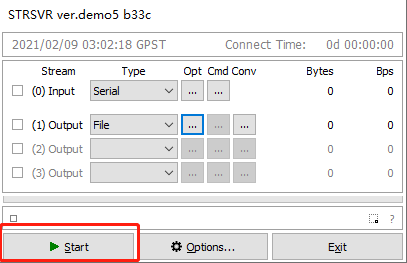
10. Collect data and decode the generated files in real time.

11.If you forget to select [ins2000] in [input stream monitor] and there is no real-time decoding, you can use the file decoding tool to decode.
file decoder download:https://github.com/aceinnazhangchen/Ins2000_deocder/releases